


ForgeHub Image Memory Guard
$0.00 – $129.00
Proactive server memory protection preventing PHP fatal memory exhaustion during large JPEG and PNG uploads.
Download Free — No Account Required
Full core functionality with zero artificial limits or nags. Download directly from GitHub Releases or WordPress.org.
What it solves
One of the most common and disruptive errors in WordPress is uploading a high-resolution photo only to encounter a generic "HTTP error" or fatal crash:
When an image is uploaded, WordPress and GD / Imagick must decompress the full uncompressed raster into RAM to generate intermediate thumbnails (thumbnail, medium, large, etc.). A 15 MB photo can easily require over 180 MB of RAM during decompression!
Image Memory Guard prevents this catastrophic crash before it happens:
Key features (Included in Free)
- Pre-Upload Memory VerificationProtects against 500 and fatal memory exhaustion errors.
- Automatic Master DownscalingKeeps photos within server safe zones.
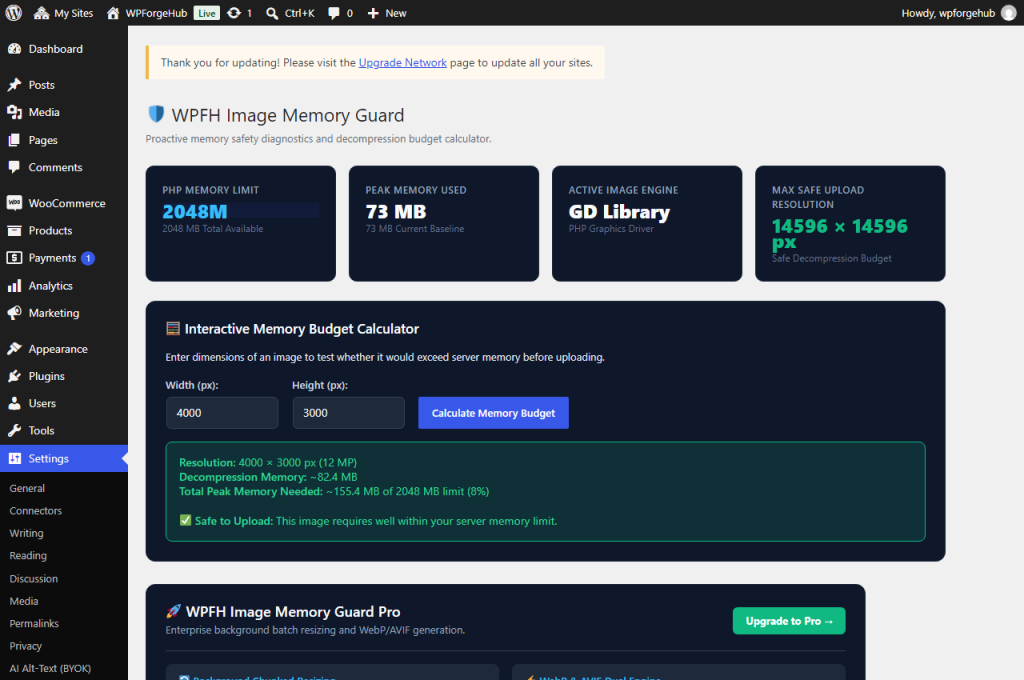
- Live System DiagnosticsMonitor PHP memory limits, peak usage, and max safe resolutions.
- Memory De-allocationCalls garbage collection after thumbnail generation cycles.
Screenshots
Privacy, BYOK & Zero-Nag guarantee
Zero server load on our side: nothing is routed through WPForgeHub. Where an AI provider is used, you bring your own key (BYOK) and requests go straight from your site to the provider you choose. We do not collect or sell your data, and we never show aggressive upgrade banners or locked tabs in wp-admin. All scripts and styles load locally from the plugin folder, with no external CDN and no Powered by links. Every form is protected with nonces and capability checks.
Setup
- Upload the forgehub-image-memory-guard folder to the /wp-content/plugins/ directory.
- Activate the plugin through the 'Plugins' menu in WordPress.
- Navigate to Settings > Image Memory Guard to view server diagnostics and test image dimensions.
Frequently asked questions
How does Image Memory Guard protect against memory crashes?
It intercepts the upload process before image decompression occurs, calculates the necessary RAM budget using binary header dimensions, and either elevates memory temporarily or downscales the master file to prevent PHP crashes.
Does this plugin alter my original images?
Only if the image exceeds your server's safe memory limit and you have enabled the Auto-Downscaling feature. Otherwise, it simply prevents the crash and displays an informative notification.
Does this plugin require any external API or service?
No. Image Memory Guard runs entirely locally on your WordPress server with zero external dependencies.
Can I try Pro before buying?
Yes. The Pro sandbox at pro.wpforgehub.com runs every plugin with Pro unlocked. Local, .test and staging sites do not use up your license seats.
What licenses are available?
The Free edition is 100% open source (GPLv2+) with no account required. Optional Pro & Priority Support licenses are available for 1 site, 5 sites and Unlimited, billed yearly or lifetime — see the Optional Pro section below.
Which PHP and WordPress versions are supported?
PHP 7.4 to 8.3 and the current WordPress release. Multisite is supported.
Do you offer refunds?
Yes. Optional Pro purchases are covered by a 14-day money-back guarantee handled by Freemius, our reseller. Write to support@wpforgehub.com for help.
Free vs Optional Pro
| Feature | Free | Pro |
|---|---|---|
| Pre-Upload Memory VerificationProtects against 500 and fatal memory exhaustion errors. | Included | Included |
| Automatic Master DownscalingKeeps photos within server safe zones. | Included | Included |
| Live System DiagnosticsMonitor PHP memory limits, peak usage, and max safe resolutions. | Included | Included |
| Memory De-allocationCalls garbage collection after thumbnail generation cycles. | Included | Included |
| Background Chunked ResizingQueue heavy resizing tasks in the background via Action Scheduler. | Optional Pro | Included |
| WebP & AVIF Dual EngineAuto-convert uploaded images to next-gen formats with CPU throttling. | Optional Pro | Included |
| WP-CLI Library AuditScan entire media library via command line for memory-heavy attachments. | Optional Pro | Included |
| EXIF Privacy SanitizerStrip location and camera metadata before decompression. | Optional Pro | Included |
Optional Pro & Priority Support
The Free core is complete and yours forever. Upgrade only if you need automation, agency scale, or priority support.
